



.jpeg "Spacebar Clicker")






.jpeg "Block Blast")
















.jpeg "Kick the Buddy")










.jpeg "Bubble Shooter")

FreeCell
How to Move Cards into the Foundation Piles in FreeCell: A Complete Guide
The primary goal is to move all the cards into the Foundation Piles. If you are new to the game or need a refresher, this guide will walk you through the layout of the game, how to arrange cards, and some cool features that can help you win!
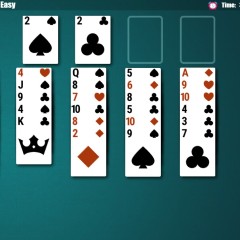
Layout of the Game
In FreeCell, the game is set up with different areas that help you organize and move your cards:
- Foundation Piles: These are the four empty spots located at the top right corner of the screen. Your goal is to move all the cards into these piles, arranged in ascending order from Ace to King in each suit (hearts, diamonds, clubs, and spades).
- Tableau: The tableau consists of several columns of cards laid out face-up. These columns overlap, and each one holds a stack of cards. You can move cards between these columns to help organize and uncover cards for your Foundation Piles.
- Wastepile: Located at the top-left corner, the wastepile holds discarded cards from the tableau. The wastepile has four empty spots, and each spot can hold only one face-up card at a time.
Rules for Moving Cards into the Foundation Piles
To successfully move cards into the Foundation Piles, they need to meet the following conditions:
- Face-up cards: Only face-up cards from either the tableau or wastepile can be moved into the Foundation Piles.
- Correct order: The cards must be placed in the Foundation Piles in the correct sequence, starting with the Ace of each suit and following in ascending order (2, 3, 4, 5... up to King). Each pile should consist of only one suit.
- Unblocked cards: Cards in the tableau must not be blocked by other cards. Only the topmost card in a stack can be moved, and it needs to be moved to the correct Foundation Pile or to a valid space.
Some Fun Features in FreeCell
In-Game Support
One of the helpful features in FreeCell is the ability to use hints. You can access hints at any time to get guidance on your next move, especially if you are stuck or need a little help. Additionally, if you make a mistake, you can undo the last move, allowing you to retry your decision without restarting the entire game.
Difficulty Levels
FreeCell offers different difficulty levels to suit players of all skills:
- Easy: For beginners or players who prefer a relaxed pace.
- Medium: A standard difficulty level for those who are familiar with the game.
- Hard: Challenging for experienced players who want to test their skills.
- Expert: For advanced players who seek a real challenge.
- Random: A mode where the game randomly selects a difficulty level for a fun and unpredictable experience.
Simple Controls
The controls in FreeCell are straightforward and user-friendly. To play, simply click on the card you want to move, and then click on the destination spot (whether it is a Foundation Pile, a Tableau column, or the Wastepile). The simple controls make it easy to focus on the strategy and enjoy the game.