



.jpeg "Spacebar Clicker")





.jpeg "Block Blast")













.jpeg "Kick the Buddy")










.jpeg "Bubble Shooter")

Galaxy Clicker
How to Earn Gems in Galaxy Clicker
In Galaxy Clicker, gems are the core currency. You will need as many as possible to buy upgrades and unlock new central planets. If you want to progress faster, here's a simple guide to help you maximize your gem income. The galaxy setting reminds me of another clicker game with a universe - Planet Clicker.
Add More Orbiting Mini Planets
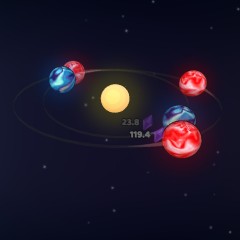
One of the main ways to earn gems is by adding small planets that orbit around the central planet. Every time a mini planet completes one full orbit, you earn a set number of gems. The more planets you have, the faster your gem counter climbs.
You can also merge planets on the first orbit. When you merge three small planets, they transform into a larger planet that moves to the second orbit. Larger planets generate more gems per revolution, meaning fewer planets but better income.
Hold to Revolve Faster
Holding down the mouse button speeds up the rotation of your planets. Faster revolutions mean faster gem production. Additionally, your auto-gem generation per second also increases while holding. However, holding is tied to the stamina bar. This technique is only effective when your stamina bar is full. Once stamina drops, rotation slows down, and gem production returns to normal.
Galaxy Clicker Upgrade List
Each central planet comes with an upgrade panel. While the gem costs increase across planets, the upgrade types remain the same. Here are all available upgrades:
- Add Planet: Spawn a new mini planet on the first orbit.
- Merge Planet: Merge 3 planets (except the ones on the final orbit).
- Increase Stamina: Boost your stamina capacity by 3%, allowing longer hold periods.
- Increase Income: Increase gem income per revolution by 3%.
- Increase Speed: Increase orbiting speed by 3%, helping you earn gems faster even without holding.